> ## Documentation Index
> Fetch the complete documentation index at: https://docs.dc.ag/llms.txt
> Use this file to discover all available pages before exploring further.
# dynamic content - Help
> Contact support and get help with the CMS.
If you need further assistance, have any issues, or require support, please feel free to reach out to us. All further information on how to contact us can be found under the Help menu.
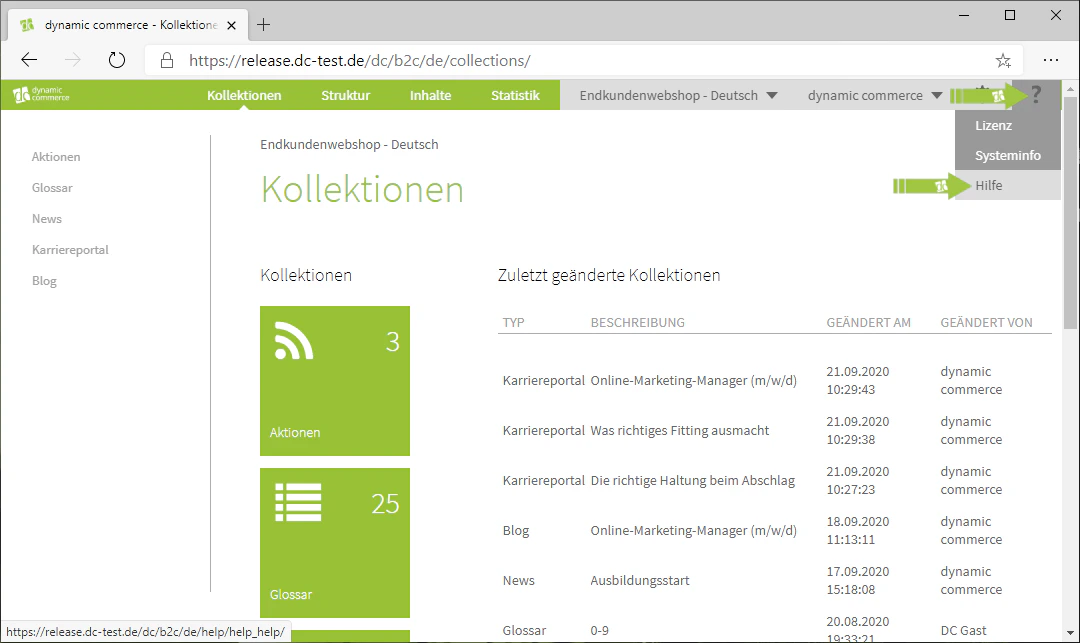
You can access it by hovering your mouse over the additional information icon — the question mark in the top right corner — and selecting "Help". There you will also find links to our support portal, where you can easily reach us by submitting a ticket. We are of course always happy to assist you.
## Navigate to the Help Menu
You can access the Help menu by hovering your mouse over the additional information icon — the question mark in the top right corner — and selecting "Help".
 ## Using the Support Portal
In the Help menu you will find links to our support portal, where you can easily reach us by submitting a ticket. We are of course always happy to assist you.
**Contact dc AG**
Office KU: Von-Linde-Str. 11, 95326 Kulmbach, Germany
Office MAK: Leopoldstraße 32, 95615 Marktredwitz, Germany
Tel: +49 9221 9652-100
E-Mail: [info@dc.ag](mailto:info@dc.ag)
## Related Topics
Orientation in the CMS and an overview of all tabs.
Manage users and permissions.
## Using the Support Portal
In the Help menu you will find links to our support portal, where you can easily reach us by submitting a ticket. We are of course always happy to assist you.
**Contact dc AG**
Office KU: Von-Linde-Str. 11, 95326 Kulmbach, Germany
Office MAK: Leopoldstraße 32, 95615 Marktredwitz, Germany
Tel: +49 9221 9652-100
E-Mail: [info@dc.ag](mailto:info@dc.ag)
## Related Topics
Orientation in the CMS and an overview of all tabs.
Manage users and permissions.